

Meta and RedTrack

Intro
Our Meta (Facebook) API integration enables you to:
- Pass all conversion data, including extra conversions, back to Meta and link it to campaigns for better optimization.
- Automatically pause non-converting creatives and campaigns on Meta, eliminating manual work.
- Keep cost data up to date in real time.
There are limited cases when Facebook allows you to use the redirect link (e.g., RedTrack campaign tracking URL), but we, as a service provider, do not recommend it and cannot guarantee the safety of your tracking campaigns.
For all your Meta campaigns, use no-redirect tracking with a custom tracking domain.
The list of PII (Personally Identifiable Information) data RedTrack can send to Meta
The following parameters are sent to Meta when a conversion is created in RedTrack:
Parameter | Description |
Meta click id | Meta click ID, identifies the Meta click that led to the conversion. Taken from sub 20 of the traffic channel. |
Browser id | Meta browser ID, used to identify a user’s browser for Meta tracking. Taken from sub 19 of the traffic channel. |
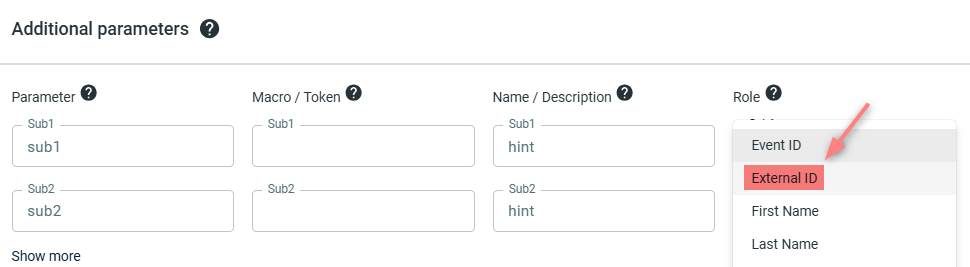
External id | External identifier for deduplication and better attribution, recommended by Meta. Pulled from rtclickid. The parameter with the External ID role must be configured in the Offer source/Brand form. The value sent to the Meta Pixel depends on how this parameter is configured: – If a parameter is assigned the External ID role, and you send it to RedTrack with the conversion, that value is sent to the Meta Pixel as the external_id. – If no parameter is assigned the External ID role, or the parameter has no value, the system sends the RedTrack clickid as the external_id by default. |
Email | Hashed email address taken from the parameter assigned the Email role in the Offer Source. |
Phone | Hashed phone number taken from the parameter assigned the Phone role in the Offer Source. |
FirstName | Hashed first name taken from the parameter assigned the First Name role in the Offer Source. |
LastName | Hashed last name taken from the parameter assigned the Last Name role in the Offer Source. |
Birthday | Hashed birth date taken from the parameter assigned the Birthday role in the Offer Source. |
Gender | Gender value taken from the parameter assigned the Gender role in the Offer Source. |
Zip | Postal code value taken from the parameter assigned the Zip role in the Offer Source. |
IP | IP address of the user at the time of the click, sourced from RedTrack click data. |
UserAgent | Browser user agent string captured during the click. |
City | Hashed city name derived from geolocation based on the click IP. |
CityUnhashed | Plain text city name derived from IP geolocation during the click. |
Country | Hashed country name based on IP geolocation at click time. |
CountryUnhashed | Plain text country name from IP geolocation at click time. |
State USA | Hashed U.S. state name based on click IP geolocation. |
State USAUnhashed | Plain text USA state name based on click IP geolocation. |
Currency | Currency for the transaction taken from click data. |
Event ID | Unique event identifier used for event tracking. Can come from either rtclickid or an assigned role. |
Event Name | Describes the type of conversion event (e.g., Purchase, Lead), based on conversion type. |
Event Time | Timestamp of the conversion event in UTC, based on the conversion’s created_at time. |
Event Source Url | URL of the page where the event occurred, defined in the offer form’s pixel settings. |
ActionSource | Describes the source of the event action (e.g., website, app), set in the offer form’s pixel settings. |
Revenue | Monetary value of the conversion taken from the conversion data. |
Content Category | Hashed value indicating the category of the content or product, based on the assigned Content Category role in the Offer Source. |
Content IDs | Product or content identifiers involved in the event, taken from the Content IDs role in the Offer Source. |
Product Name | Name or title of the product/content involved in the conversion, taken from the Product Name role in the Offer Source. |
Contents | Detailed list or array of products/content involved in the conversion, taken from the Contents role in the Offer Source. |
OrderID | Unique order identifier for the transaction, sourced from either the order ID or rtclickid. |
SubscriptionID | Identifier for a subscription or recurring event, based on rtclickid. |
Integration
1. Known limitations: check your setup first
Pixel and Conversions API tracking covers standard accounts well. Most limits here come down to your niche or account type, and several are controlled by Meta, not by RedTrack.
If your setup includes… | What to expect | What to check |
|---|---|---|
You compare RedTrack to Meta Ads Manager 1:1, or see over/under-reporting | Meta Ads Manager applies its own attribution window and modeled conversions, so its totals rarely match a click-based tracker exactly. RedTrack is your source of truth for postback conversions. | If numbers look off, confirm: • fbclid captured on the click URL • Pixel ID and Conversions API token valid • event_id (deduplication key) sent in both Pixel and Conversions API • events mapped to standard Meta events • one source per pixel set, or deduplication understood • confirm in Logs → Conversions |
A regulated niche (health, CBD, adult, gambling, iGaming) | If a domain is blocked from receiving Pixel events, the Conversions API can still send conversions server-side. But Meta can remove conversion events for some verticals at any time — when that happens, tracking stops because policy changed, not because of a tracker bug. | Treat the Conversions API as working until Meta changes policy for your niche; watch for sudden event drops after Meta updates. |
Video or Smart campaign types managed from the tracker | Some campaign types can’t be edited by any third-party tool through the API. | Manage those campaign types in Meta Ads Manager directly. |
Unconfirmed COD orders sent to Meta as Purchase events | Meta deduplicates events and can dock data quality for unconfirmed revenue. With COD rejection often 30–50%, the algorithm learns to chase users who “buy” but never pay. | Send only confirmed purchases as Purchase events; hold COD placements until the order is paid. |
A flagged tracking or redirect domain | Meta can flag or block tracking and redirect domains, and account or automation bans are handled by Meta. A tracker can’t lift either. | Keep one clean tracking domain; resolve flags or bans with Meta directly. |
2. Add a custom tracking domain
1. Add a CNAME record pointing to your RedTrack default domain in your domain registrar.
2. On the left menu, go to Tools → Domains → Create new domain.
3. Add the integrated domain to your RedTrack account → activate the Free SSL toggle.
– This step-by-step guide.
– This video tutorial.
3. Add the offer/store tracking URL you are promoting
This is the target destination link where you plan to run the traffic: it can be an affiliate offer, a direct link to your website, or the shop.
1. Add the offer source: New from template/New from scratch → find the affiliate network you work with/add your custom name → Save.
Meta recommends having this parameter with the CAPI for better attribution.
The value sent to the Meta Pixel depends on how this parameter is configured:
– If a parameter is assigned the External ID role, that means you need to send it to RedTrack with the conversion; that value is sent to the Meta Pixel in the external_id field.
– If no parameter is assigned the External ID role, or the parameter has no value, the system sends the “RedTrack clickid” in the external_id field by default.
Your Offer source → Additional parameters → assign the External ID role to the parameter:
2. Add the offer link: Offers → New → choose the offer source from the list, add the offer URL → save the changes.
For example: &affsub={clickid} where {clickid} is RedTrack parameter
1. Go to Stores → New → Add your store (it is the name of your shop).
2. On the same page, in the Additional parameters section, add the purchase data parameters – Name/Description is what you will see in reports – Roles define their use with CAPI.
Meta recommends having this parameter with the CAPI for better attribution.
The value sent to the Meta Pixel depends on how this parameter is configured:
– If a parameter is assigned the External ID role, that means you need to send it to RedTrack with the conversion; that value is sent to the Meta Pixel in the external_id field.
– If no parameter is assigned the External ID role, or the parameter has no value, the system sends the “RedTrack clickid” in the external_id field by default.
Your Store → Additional parameters → assign the External ID role to the parameter:
3. Go to Store tracking URLs → New → Add your store URL (this is your e-com shop).
4. Add Meta integration to RedTrack
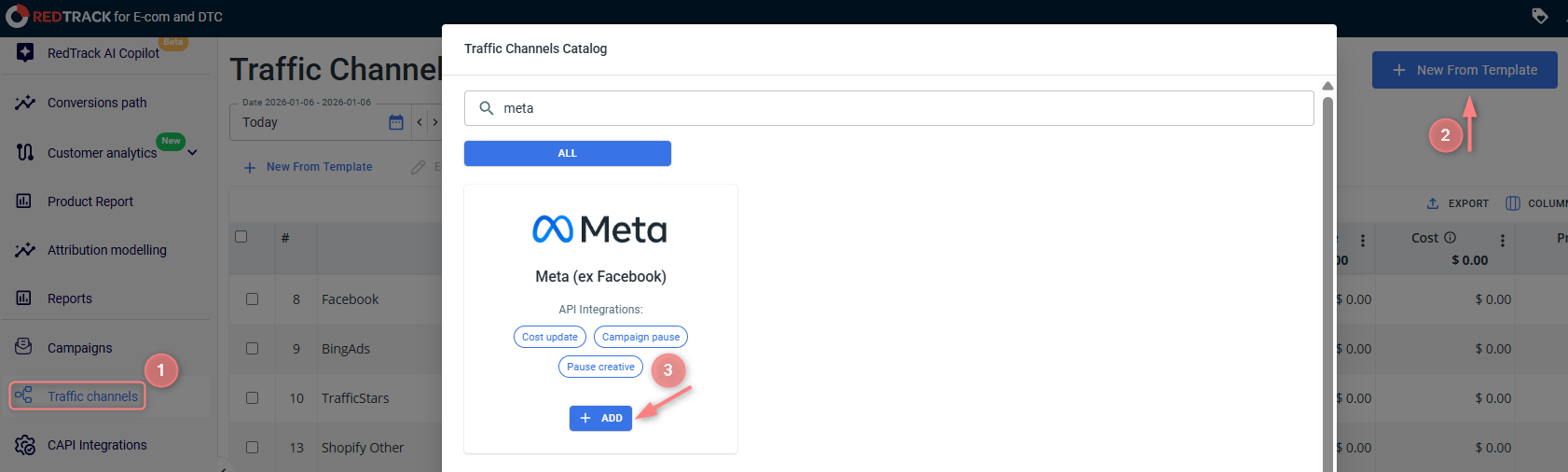
1. Traffic Channels → New from template → Meta → Add → Save:

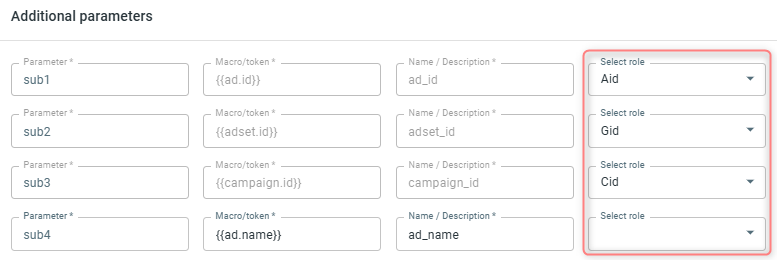
PAY ATTENTION TO THE ADDITIONAL PARAMETERS SECTION:
You can modify some Facebook parameters in the opened template. Blocked (greyed) parameters should be used under the same sub-values with the same roles assigned as provided in the initial template.
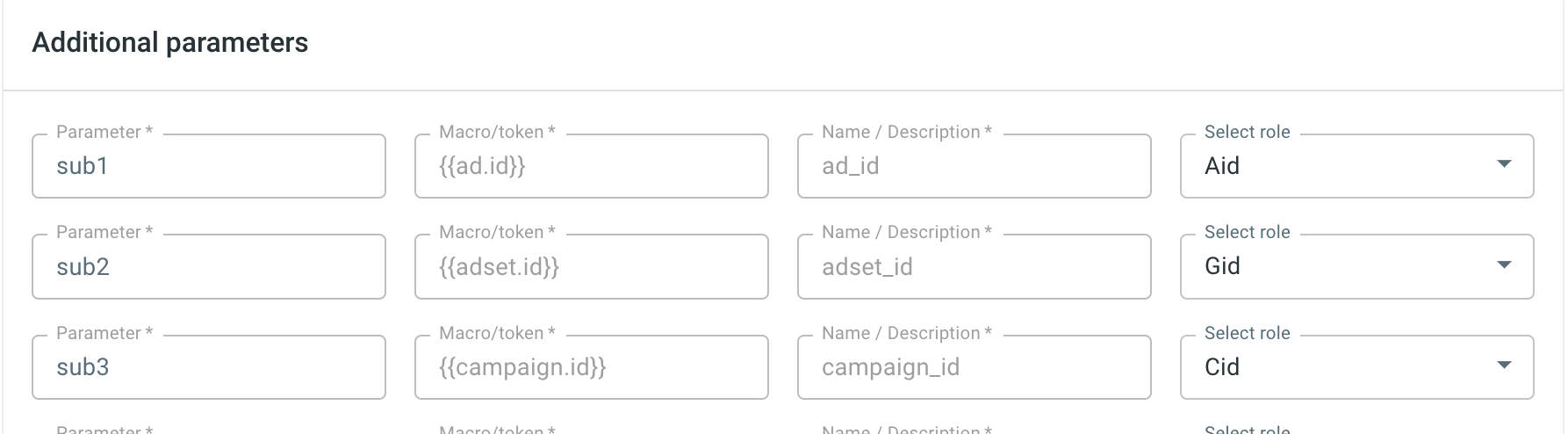
The following parameters and their roles are essential for the API cost integration:
{{ad.id}} should always be with Aid role
{{adset.id}} should always be with Gid role
{{campaign.id}} should always be with Cid role
“fbclid” parameter is required for sending the conversion data back to Meta. This parameter should always be the last in the line, meaning that there should be no other parameters when you add the parameters string to Meta:

DO NOT edit sub 19 or sub 20 parameters in the template, since they have the hardcoded fbp and fbc in these places.
- fbp identifies a visitor’s browser session when they come to your site from Meta.
- fbc stores the Meta Click ID when a user clicks a Meta ad, allowing attribution back to that ad.
The Meta Conversions API requires these parameters, and they must stay in their exact format. Altering them can disrupt attribution, leading to inaccurate tracking and unreliable reporting.
2. In the added template:
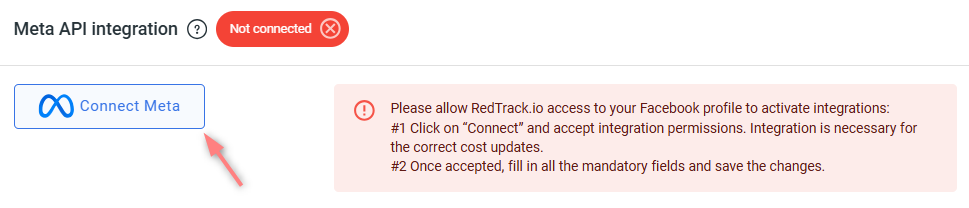
- Go to Meta API Integration section → Connect Meta → verify your ad account:
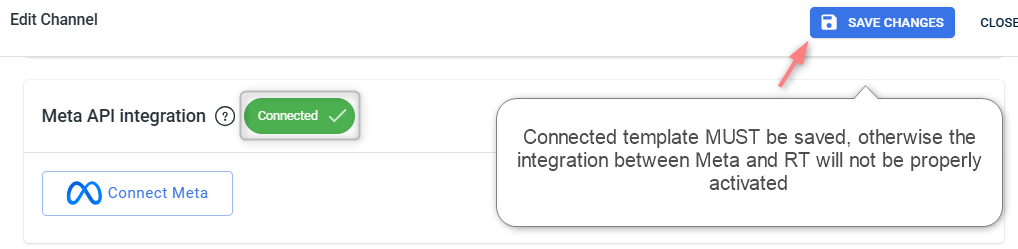
- Once you are redirected to your RedTrack account settings and see the Connected button, it means Meta accepted the integration → Save changes to the template:
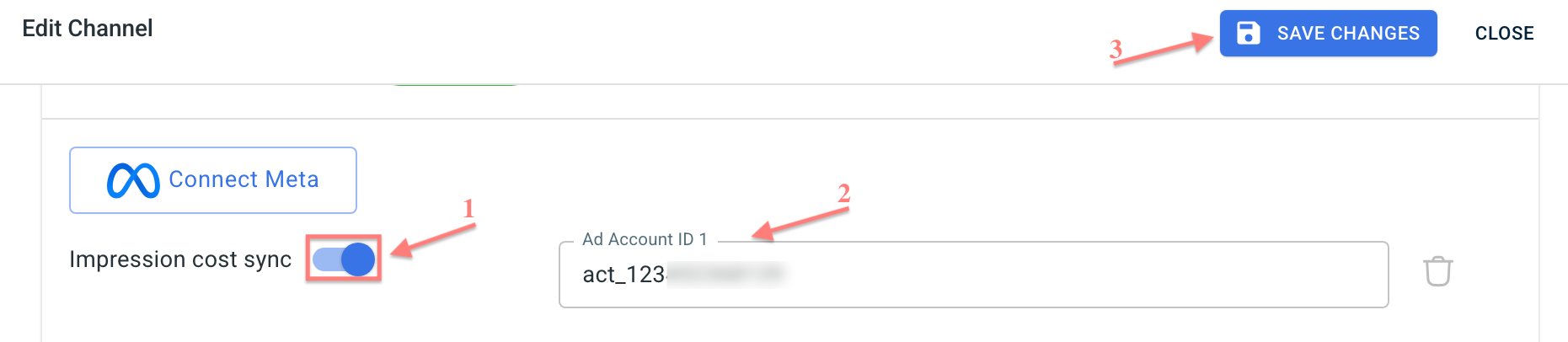
3. Enable Impression cost sync if you want RedTrack to record Meta costs when ads receive impressions and spend but no real clicks:
- Enable the Impression cost sync toggle → add your Meta Ad Account ID in the act_12345 format → Save:
– Cost update is enabled in the campaign.
– In Meta, the ad URL or URL parameters field contains cmpid with the RedTrack campaign ID and the required Meta ID parameters.
RedTrack uses these parameters to create a technical click and assign the impression cost to the correct campaign.
5. Create a campaign/ad tracking in RedTrack
Creating a campaign/ad tracking in RedTrack
To create a campaign in RT act, depending on your account type:
Campaigns → Create new campaign → fill in the info in all the sections and tabs:
- General: Give it the name, and choose the traffic channel, tracking domain, and cost-tracking method.
- Funnels: Choose the type of funnel you are using and add the elements from the drop-downs.
- S2S postback: This field will be filled in automatically based on the data you have added to your traffic channel settings.
- Auto update costs: Do not forget to turn the toggle on if you are working with the API-integrated traffic channel
Campaigns → Create new campaign → use this guide to help you set up campaign for the organic traffic.
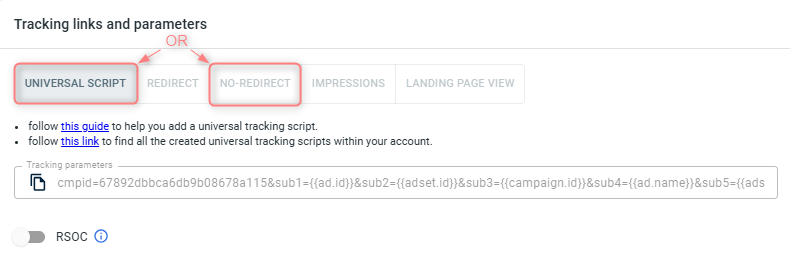
2. Once the Campaign is saved, go to Tracking links and parameters → copy the corresponding tracking parameters and the script depending on tracking method you decided on:
Therefore, we strongly recommend using the no-redirect tracking method (either with the Universal Script or the No-Redirect).
– Use Universal Script when you’re working with the same landing page across multiple traffic channels.
– Use No-Redirect Script when you’re working with one landing page and one traffic channel.
IMPORTANT!
– If you choose the simple No-Redirect option: once the campaign is saved, both the tracking parameters and the script are generated automatically. You only need to copy and apply them.
– If you choose the Universal Script option: once the campaign is saved, only the tracking parameters are generated automatically. You’ll need to create the universal tracking script manually – follow this guide.
3. Apply Script & Parameters.
- Paste the script into your landing page code.
- Add the tracking parameters to your Meta campaign (see Step 7 “Create an ad on Meta” of this guide).
1. Ad Tracking → New Ad Tracking → Fill in the info in all the sections and tabs:
- General: Give it the name, and choose the traffic channel, and cost-tracking method.
- Funnels: Choose the type of funnel you are using and add the elements from the drop-downs.
- Ad Spend Sync: Do not forget to turn the toggle on if you are working with the API-integrated traffic channel
2. Once the Ad Tracking is saved go to Ad Tracking Parameters (UTMs) → copy the tracking parameters from the Tracking parameters (UTMs) tab:
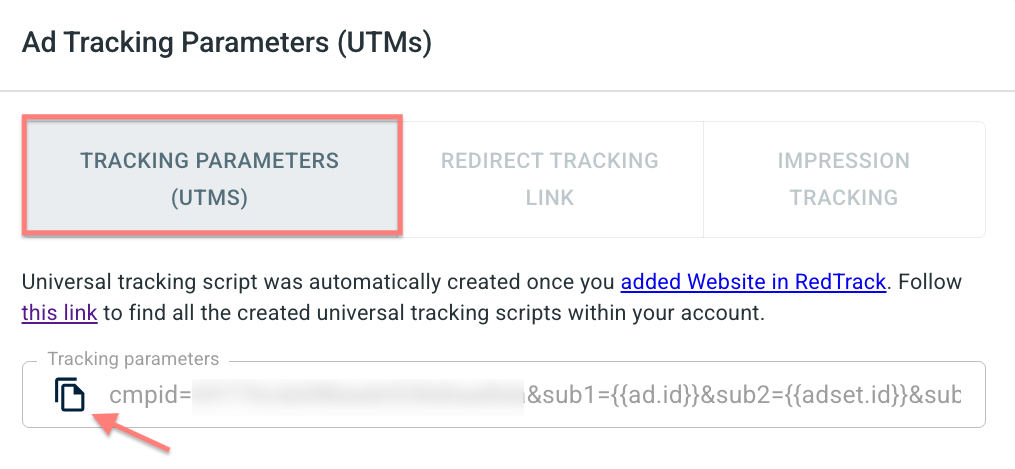
3. Apply Script & Parameters.
- Paste the script into your landing page/website code.
- Add the tracking parameters to your Meta campaign (see Step 7 “Create an ad on Meta” of this guide).
Special case: redirect tracking and fbc,fbp parameters
When using redirect tracking with Meta, the fbc and fbp parameters are not captured by default. This leads to incomplete data tracking.
To make it work, act as follows:
1. burger menu → Settings → enable the toggle Redirect for Meta → Save changes:

2. Place the following script on your landing/website at the end of the body:
<script src="https://{{domain}}/clickupd_fbp_fbc.js" defer></script>Make sure the landing/website page domain matches the Meta cookie domains.
6. Get Conversion API Key & Pixel ID from your Meta account
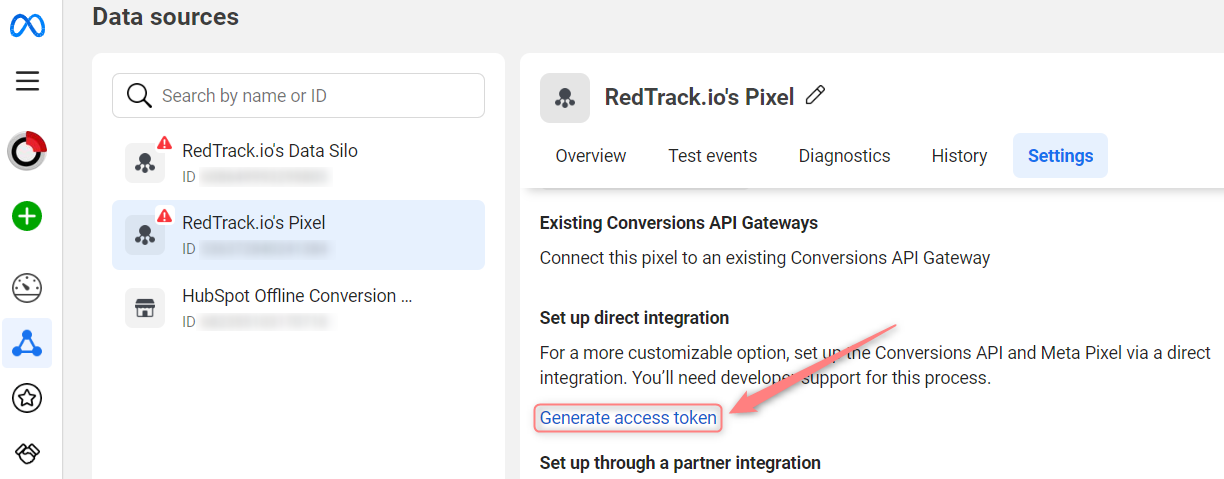
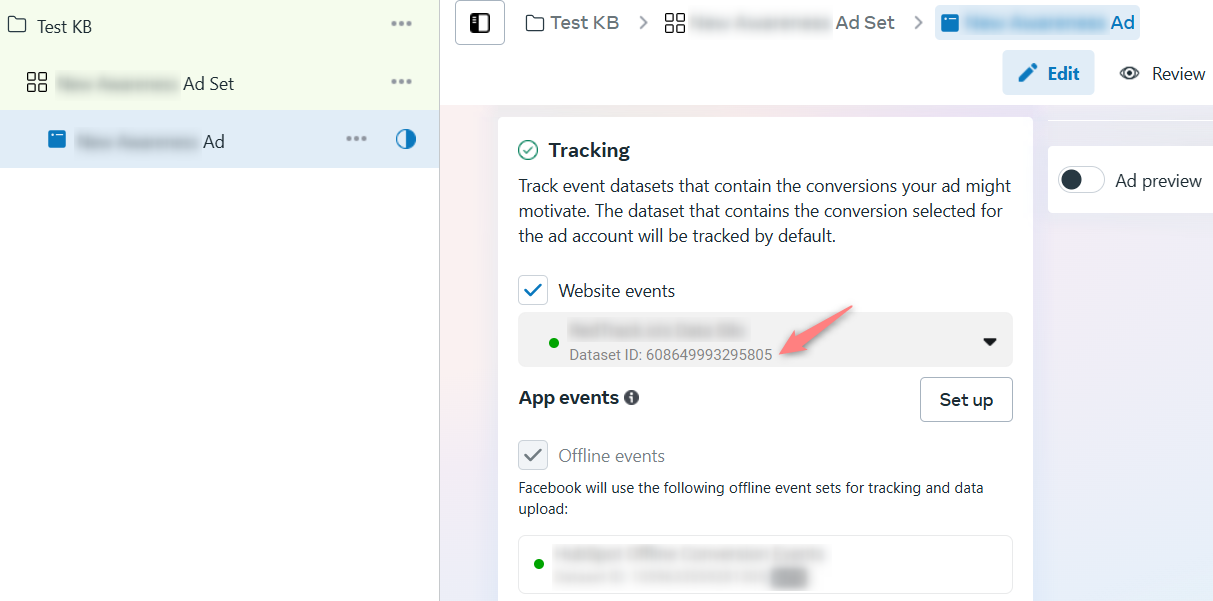
7. Configure the Meta pixel in RedTrack
Now in your RedTrack account, you should:
- Set up Meta pixel (add the copied Pixel ID & Conversion API Token to CAPI Integrations, configure custom conversion matching, define payout values, etc.)
- Assign the added pixel details to either the Facebook traffic channel or your offer/store.
1. RedTrack → CAPI Integrations → Meta → Add New:
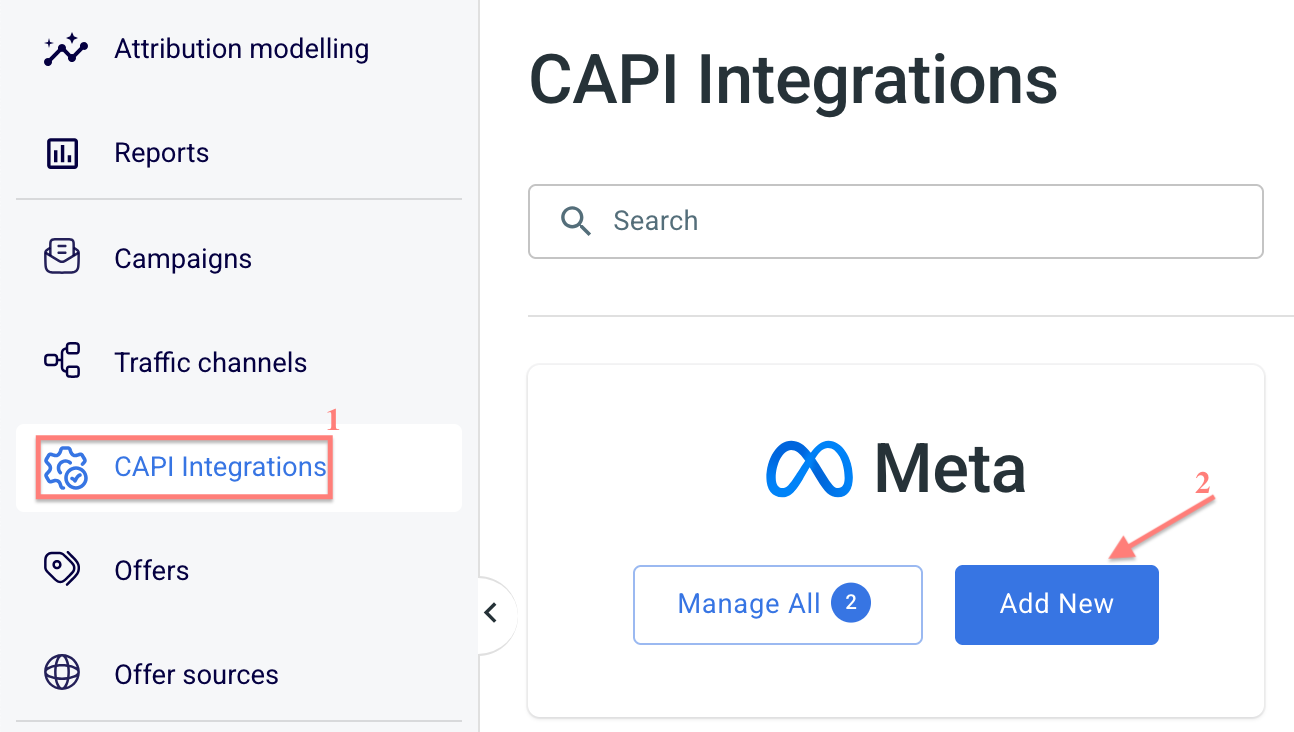
2. Fill in the mandatory fields → Save:
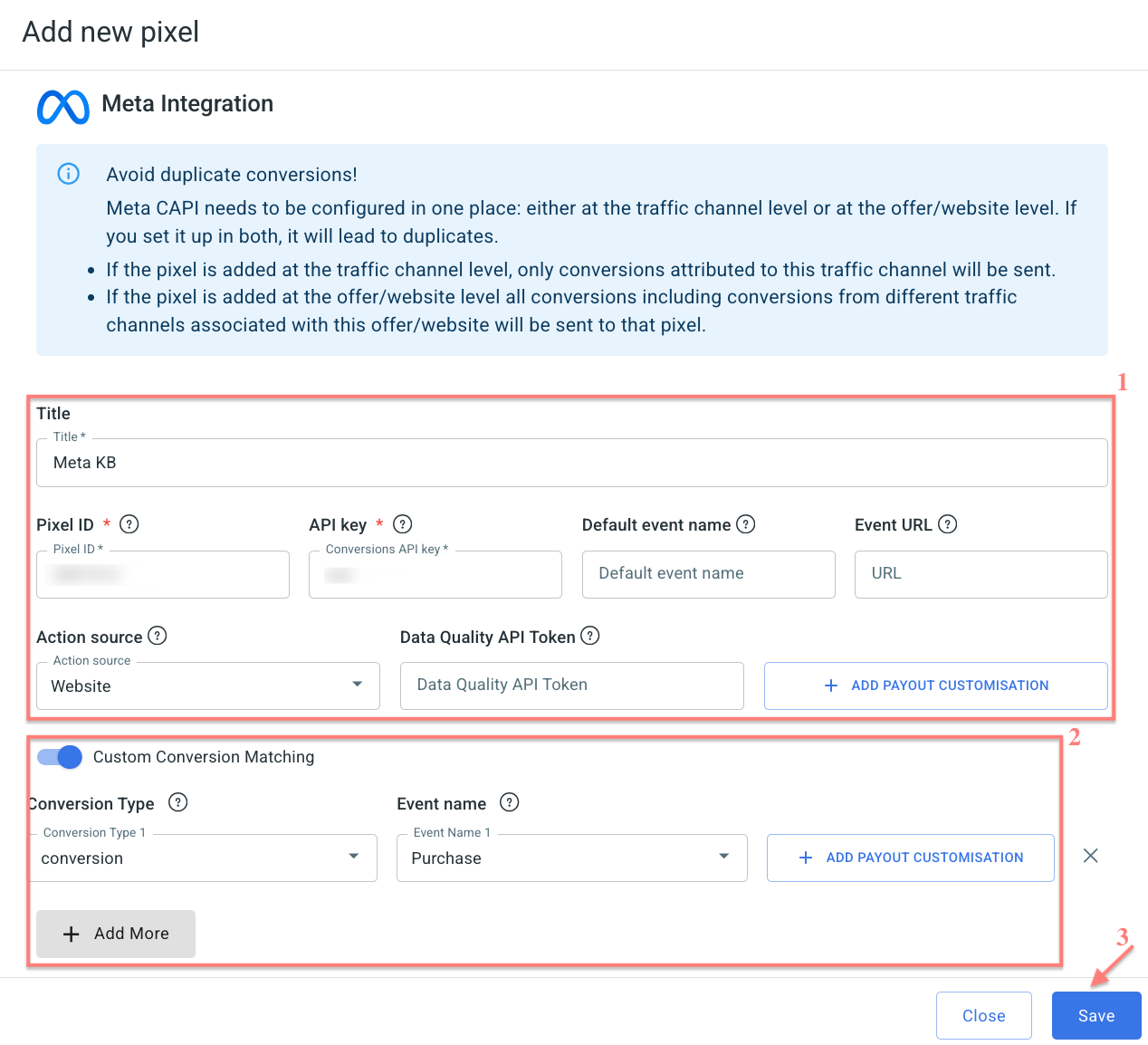
Give your pixel a name to distinguish it from all the other added pixels.
That’s where your Meta pixel goes.
That’s where your Meta access token goes.
1. Add Default event name
Here goes the event name for the default conversion in RedTrack, when no type= is used in the postback or no conversion name information is sent to RedTrack:
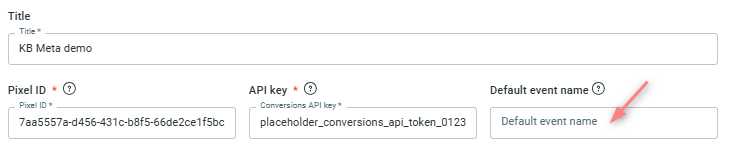
– If the field remains empty, the default conversion is sent with the event under the name Purchase.
– If the field is filled in, the default conversion is sent with the name specified in that field.
2. Set up a payout customisation
Payout customisation for the Default event name (default conversion type) serves to control the financial data associated with this conversion event.
You can define a concrete payout type and value that RedTrack will associate with that conversion event when reporting to Meta.
Since you can define a payout value for both the Default event name and the events in the Custom Conversion Matching section, you should know that if the payout type is configured for the same event in both places, the settings in the Custom Conversion Matching section will take priority.
How to set up payout customisation
Press Add payout customisation → select the Payout type → define the payout value for the default event:
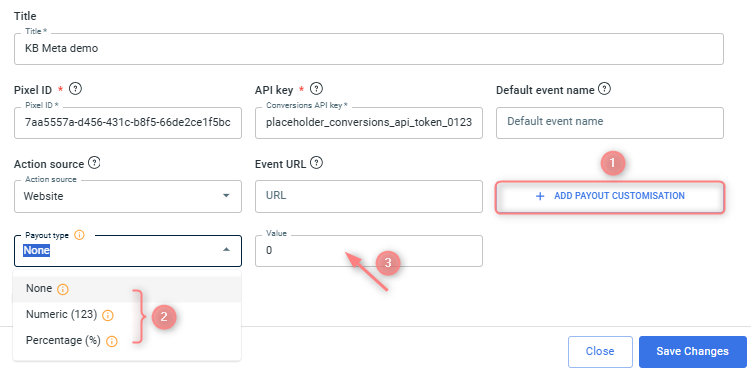
– None: RedTrack will send the full revenue amount associated with the conversion event.
– Numeric: RedTrack will send this fixed amount as the revenue.
– Percentage: RedTrack will calculate and send the specified percentage of the revenue.
Example
Let’s break down the revenue configuration from the screenshot:
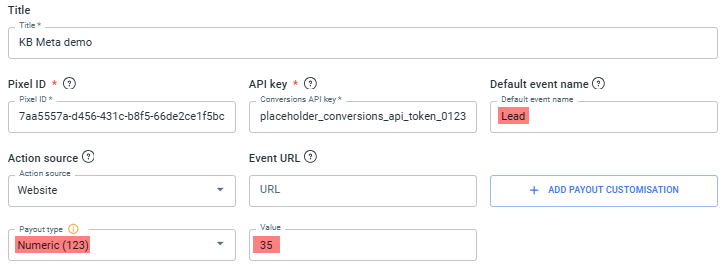
Once the Lead conversion type is triggered, regardless of the actual payout value associated with the conversion (e.g., whether it’s $100 or $10), RedTrack will send exactly 35 as the revenue value for this Lead event to Facebook via the Conversion API.
This is the URL where the event occurs. Use the https://domain.name URL structure.
About Meta domain verification
Why verify your domain in Meta
Meta no longer requires mandatory domain verification for configuring web events, however, it is highly recommended.
Why it’s still highly recommended:
- Grants control over link-preview editing via Meta’s Brand Safety.
- Secures your domain so only verified Business Managers can claim/configure it.
- Improves tracking reliability (especially for Pixel + CAPI setups) by preventing ownership conflicts.
Risks if you skip verification:
- Another Business Manager might claim your domain and take over event setup.
- You may lose control of how link previews appear in paid and organic content.
- Attribution may be less stable/accurate when using server-side events + Pixel without verified ownership.
How to verify your domain in Meta
– via meta tag
– via the uploaded HTML file
– via DNS record
For the domain verification procedure details on Facebook, check out the following guides:
– Domain verification in Meta Business Manager
– Methods of domain verification on Meta
The steps below will demonstrate the DNS record management method.
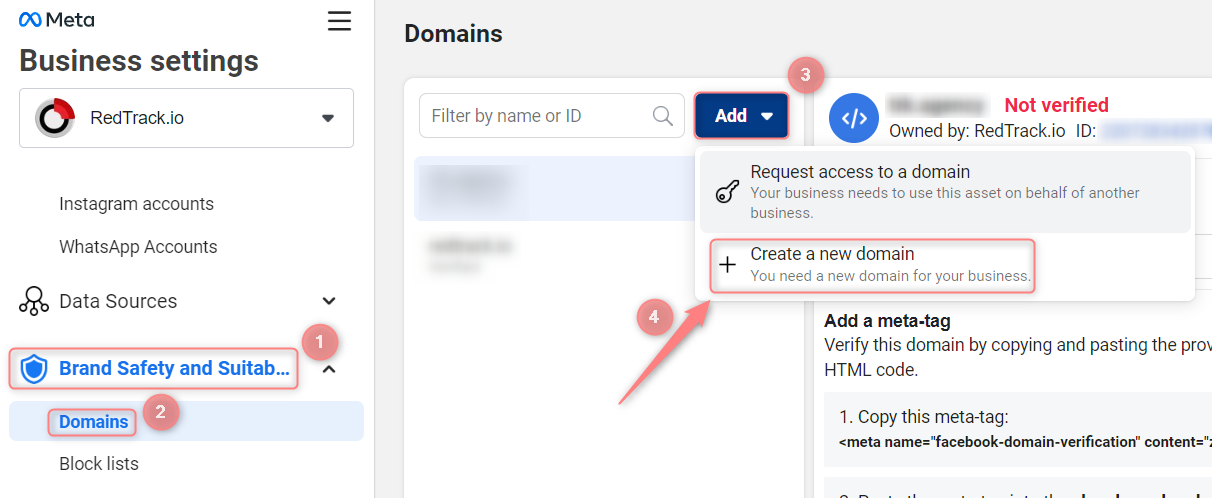
1. Business Manager → Brand Safety and Suitability → Domains → Add → Create a new domain:
2. Paste your domain → Add:
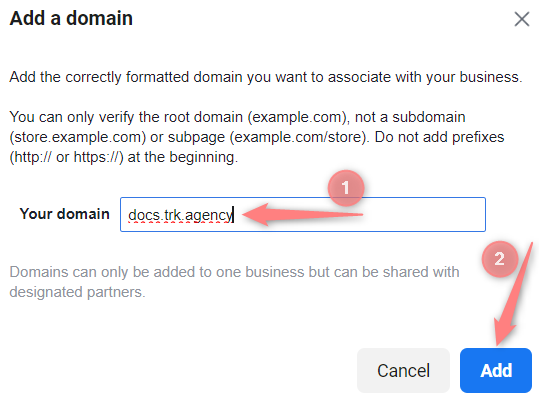
Correct: website.com.
Incorrect: www.website.com or https://website.com.
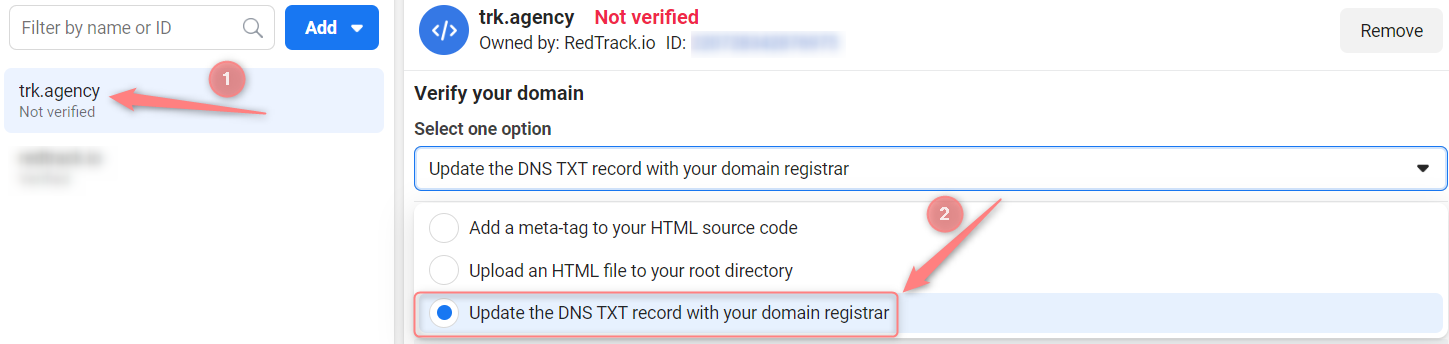
3. Select the target domain → choose the DNS verification method:
4. Copy your unique TXT value:
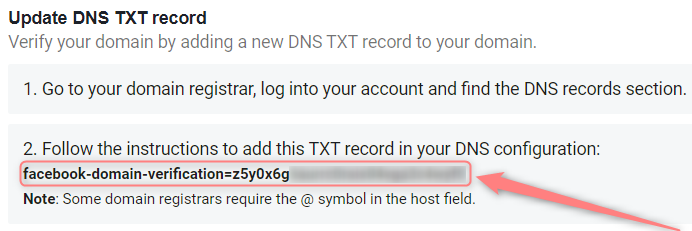
5. Go to your domain registrar → open DNS settings and add a new record with the following values:
- Host: @
- Points to: your unique TXT record from point 4
- TTL: the lowest possible
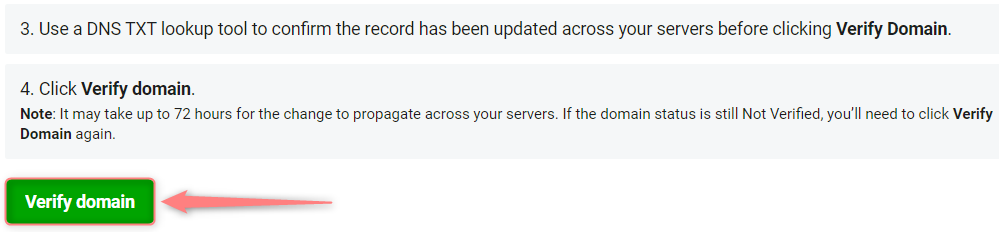
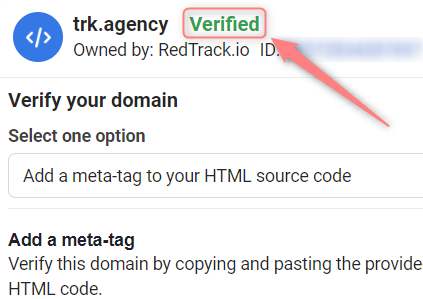
6. Give it some time for the data replication to happen (approximately 1 hour), then verify the domain in your Meta domain settings:
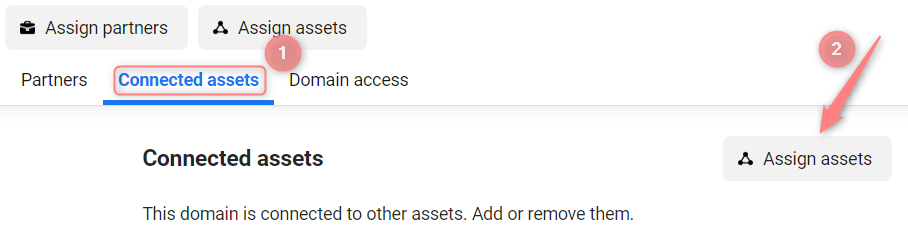
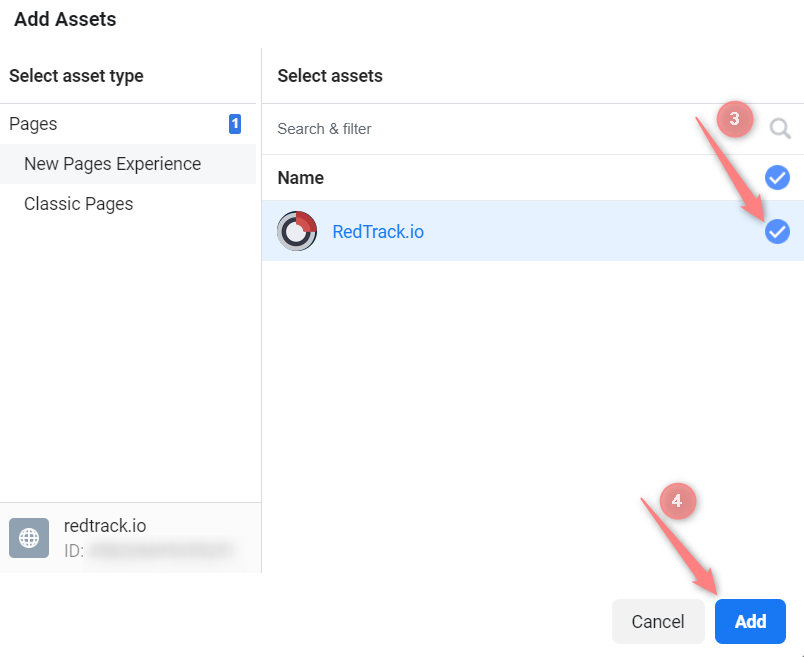
7. Associate the domain with your page:
This is where your event originates from. We recommend using the Store tracking URL option.
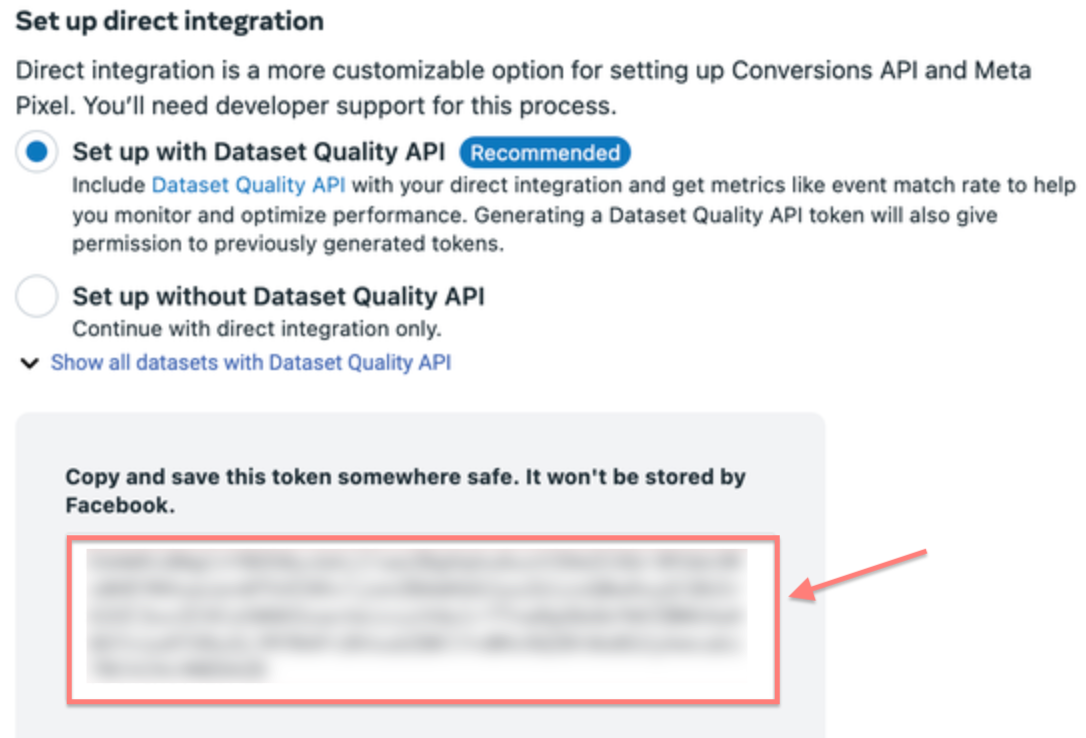
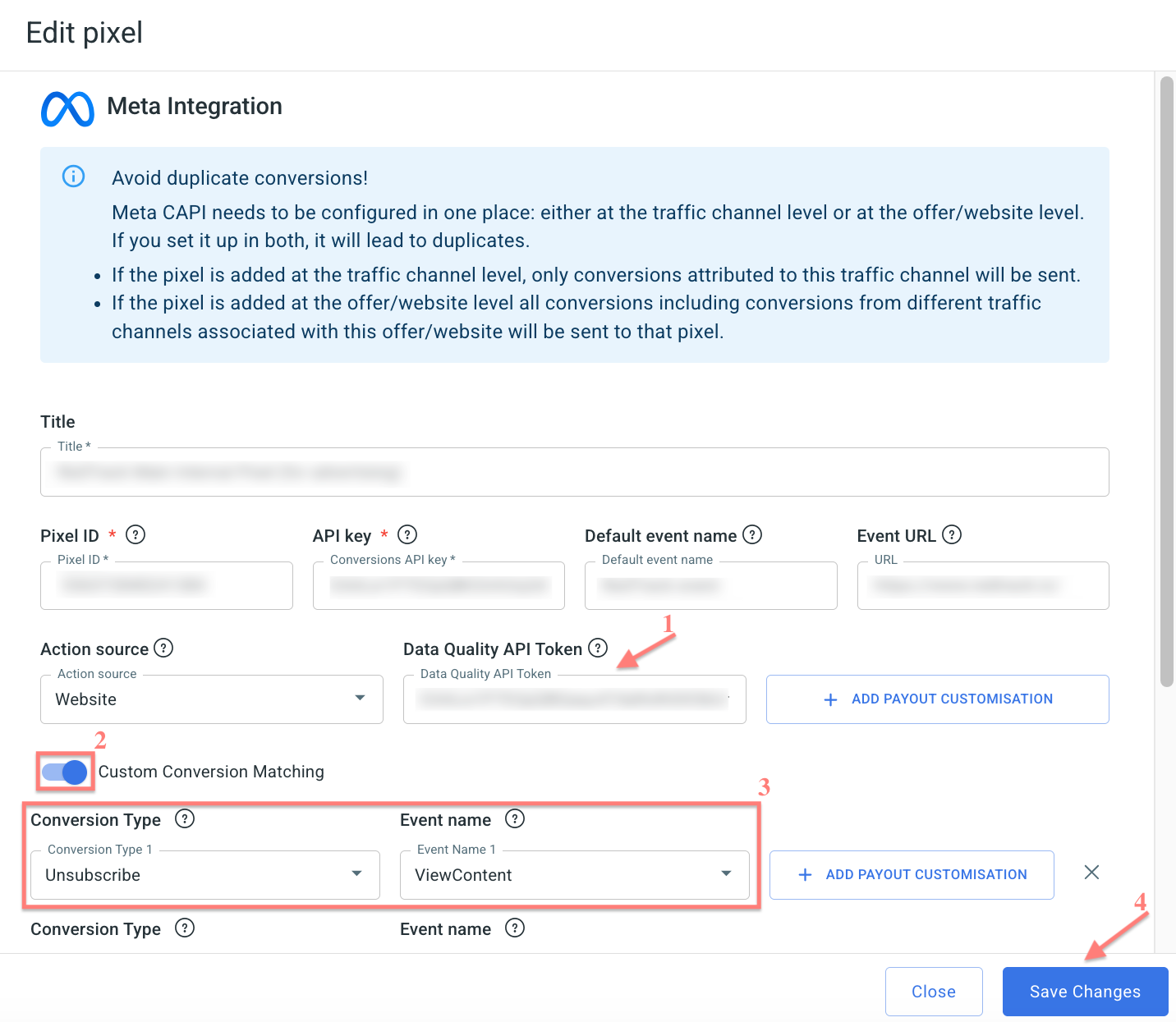
Data Quality API Token allows RedTrack to access Meta’s Dataset Quality API for your Pixel/Dataset. It is used to sync EMQ Score metrics so you can monitor Pixel performance directly in RedTrack.
To generate it, go to Meta Events Manager → select your Pixel/ Dataset → Settings → Set up direct integration → Set up with Dataset Quality API → copy and paste it into the Data Quality API Token field in RedTrack:
To set up conversion matching, act as follows:
1. Add conversion events you want to track with RedTrack.
Tools → Conversion tracking → Conversion type → add the events you want to track → Save.
2. Enable the Custom Conversion Matching toggle in the pixel settings → match the events from the Conversion Type column with the events from the Event name column:
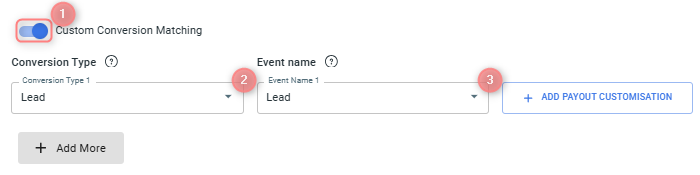
Under the Event name column, you select Meta’s event names.
3. Set up Payout customisation for the matched events.
You can configure either block on its own, or both at the same time:
Scenario 1: You decide to set EITHER Payout type & Value OR Postback when conversion payout. In that case, look for the examples of how that works out in the blocks below.
Scenario 2: You decide to set up both Payout type & Value AND Postback when conversion payout. In that case:
* Postback when conversion payout controls which conversions are allowed to be sent to Meta.
* Payout type & Value controls what payout value will be sent for those conversions.
Thus, in scenario 2, first the postback condition decides whether a conversion should be forwarded → then, the payout customisation decides what payout amount is included in that conversion when it is sent.
3.1 Payout customisation → Payout type & Value
Why use payout customisation
Payout customisation for the matched Conversion Type & Event Name controls the financial data associated with this conversion event. You can define a concrete payout type and value that RedTrack will associate with that conversion event when reporting to Meta.
How to set up payout customisation
Press Add payout customisation → select the Payout type → define the payout value for the matched event:
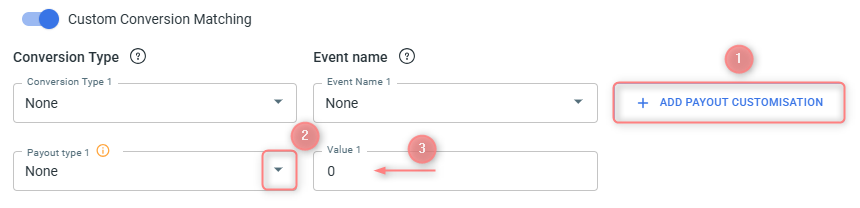
– None: RedTrack will send the full revenue amount associated with the conversion event.
– Numeric: RedTrack will send this fixed amount as the revenue.
– Percentage: RedTrack will calculate and send the specified percentage of the revenue.
Example
What’s given:
You receive 3 conversions with different payouts:
- Conversion 1 → $20
- Conversion 2 → $10
- Conversion 3 → $30
Payout setup example 1:
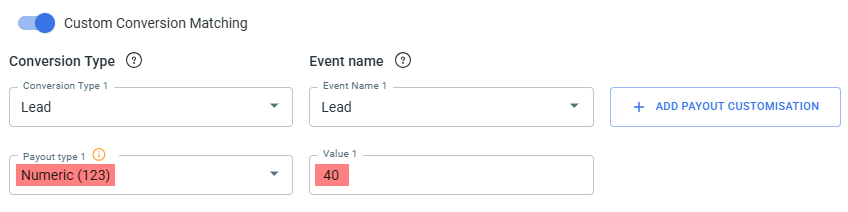
What it means:
You want every conversion sent to Meta with a fixed payout of 40, regardless of its actual payout.
RedTrack ignores the original payout and replaces it with 40 for reporting.
Outcome for payout setup example 1:
- Conversion with $20 → sent as 40
- Conversion with $10 → sent as 40
- Conversion with $30 → sent as 40
Payout setup example 2:
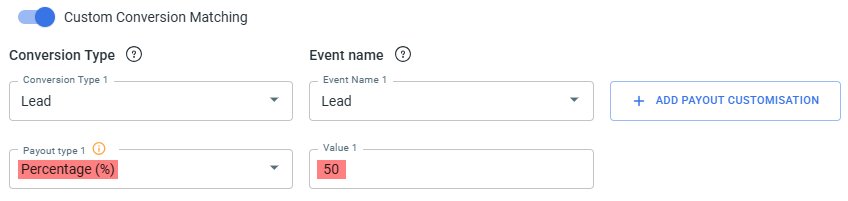
What it means:
You want to send 50% of each conversion’s actual payout to Meta.
RedTrack calculates half of the real payout and uses that number for reporting.
Outcome for payout setup example 2:
- Conversion with $20 → sent as 10
- Conversion with $10 → sent as 5
- Conversion with $30 → sent as 15
3.2 Payout customisation → Postback when conversion payout values
Why set up a conditional postback for the matched events
This feature provides control over the conversion data shared with your Meta pixel by adding a financial filter for each matched conversion type. By defining specific payout or revenue thresholds, you ensure that only high-value or desired conversions are used by Meta’s ad optimization algorithms, while all conversions are fully tracked in RedTrack.
How to set up a conditional postback for the matched events
To activate this feature, press Payout customisation next to the matched events → select the Postback when conversion payout measurement and define the value for it:
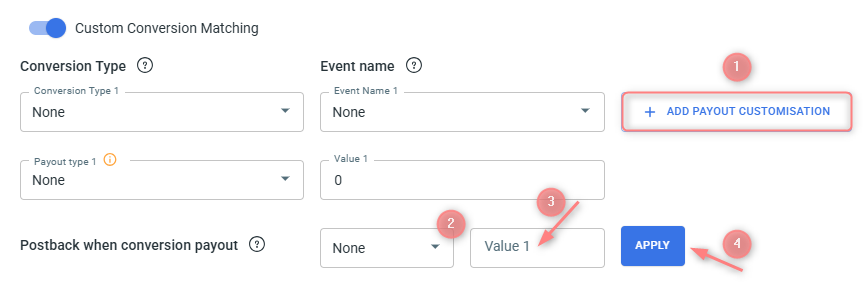
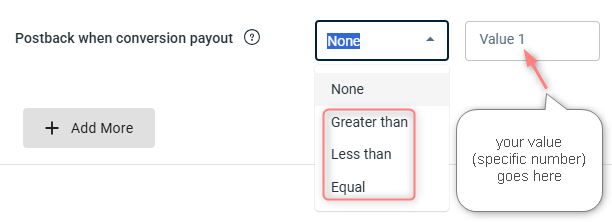
Select the logical relationship that must be true between the conversion’s actual payout and the specific value. The options govern how the system filters the conversion:
* Higher than: The conversion is sent only if its payout is strictly greater than the specific value.
* Less than: The conversion is sent only if its payout is strictly smaller than the specific value.
* Equals: The conversion is sent only if its payout matches the specific value exactly.
The system will check if the conversion meets the selected criteria:
– If it does, the conversion will be sent to the Meta pixel.
– If it does not meet the criteria, the conversion will not be sent to Meta, though it will still be registered in RedTrack.
Example
What’s given:
You receive 3 conversions with different payouts:
- Conversion 1 → $20
- Conversion 2 → $10
- Conversion 3 → $30
Setup for Postback when conversion payout:
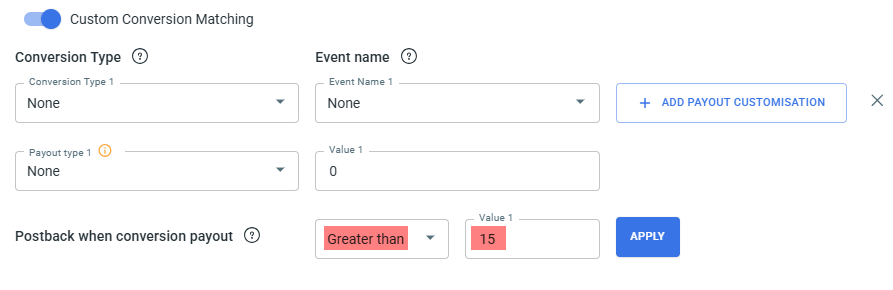
What it means:
Only conversions with a payout above 15 will be sent to Meta via CAPI.
Conversions with a payout of 15 or lower will stay in RedTrack but won’t be forwarded.
Outcome in this setup:
- $20 → sent
- $10 → not sent
- $30 → sent
So, only conversions 1 and 3 match the rule and are forwarded to Meta.

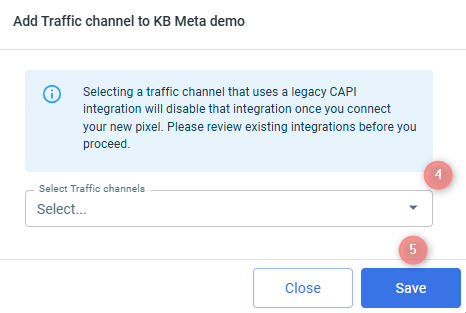
3. To assign this pixel: View details → select Traffic channel or Websites → Add new → select destination → Save:
– If you activate your pixel via Meta traffic channel, only conversions attributed to this traffic channel will be sent to that pixel.
Adding pixel to both the offer form and Meta traffic channel will lead to duplicates.


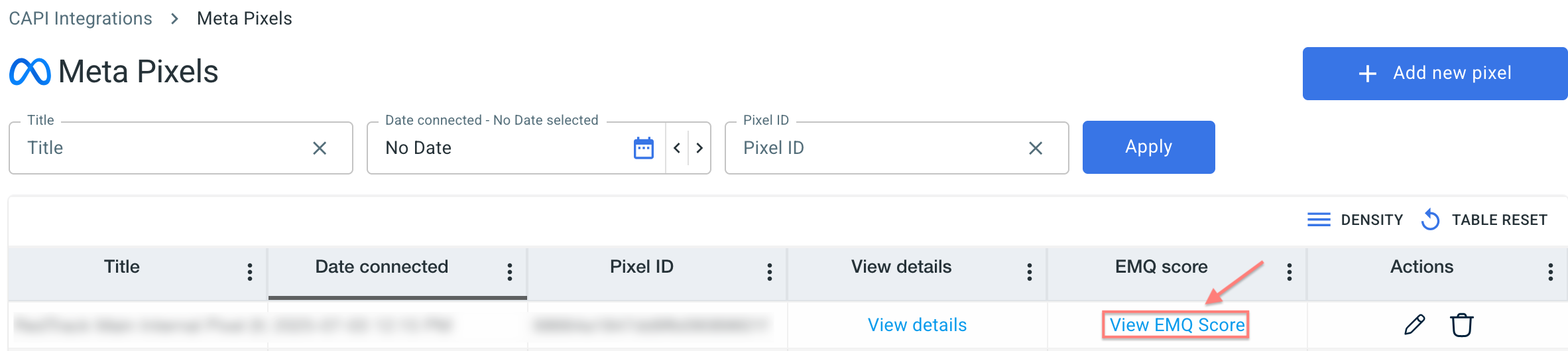
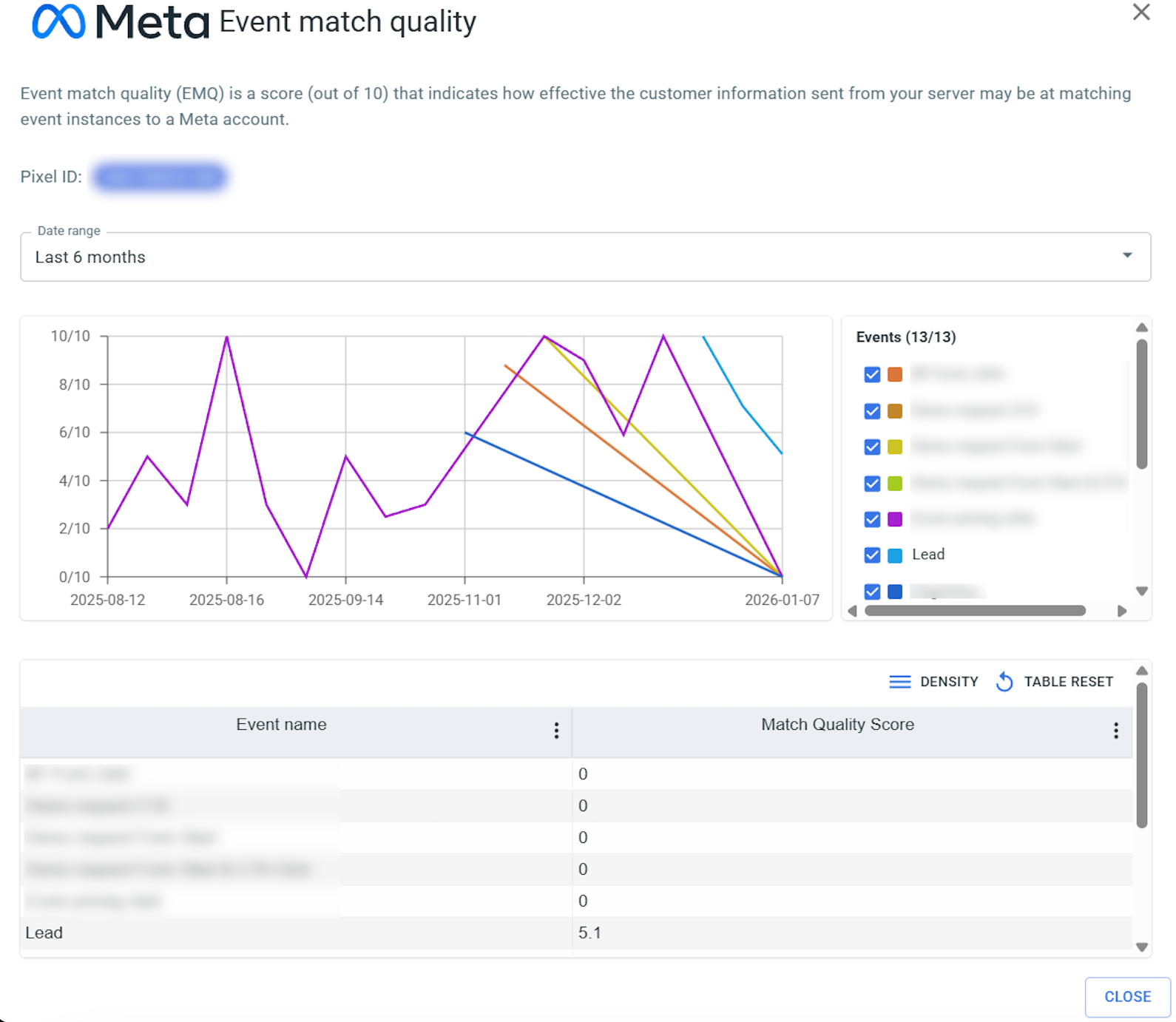
4. Click View EMQ score to see Event Match Quality metrics from your Pixel without switching to the Meta interface:
8. (if you haven’t done it yet) Create an ad on Meta
Ads Manager → Create Ad → create a new campaign or use an existing campaign → set up campaign parameters → copy paste your LP URL/Website URL (the link without tracking parameters) under the website URL → add additional tracking parameters (universal script or tracking parameters (UTMs)) in the “URL parameters” section
– If you need to be sure you receive the correct names, add them to the tracking parameters manually or analyze the data by IDs instead:
cmpid=5f92a30bc860ee0001fa9996&sub1={{ad.id}}&sub2={{adset.id}}&sub3={{campaign.id}}&sub4=myad&sub5=myadset&sub6=mycampaign&sub7={{placement}}&sub8={{site_source_name}}
– If there are already some UTM parameters in the URL parameters field, you do not have to delete them, just append the parameters taken from your campaign in RedTrack to the already existing parameters with the help of the ampersand symbol: “&”.
Use this tutorial to help you add your LP URL and tracking parameters properly in Ads Manager.
9. (optional) Warm up your Meta account with test conversions
To start a live campaign, ensure everything is in place. At this point, we will need to warm up your account with simulated conversions.
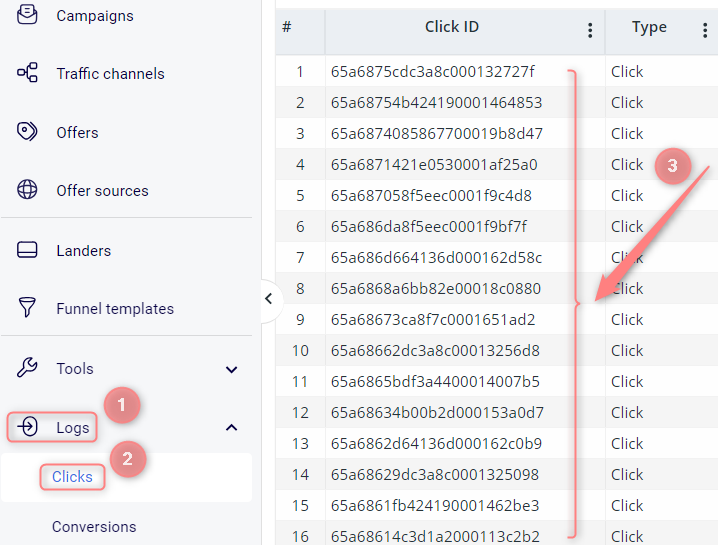
1. Once you’re done with the integration and have created a Meta campaign, you need to run some live clicks from Facebook.
We will need them for conversion generation. To find your clicks, go to Logs → Clicks:
2. Tools → Conversion tracking → copy the link from the S2S conversion tracking field:
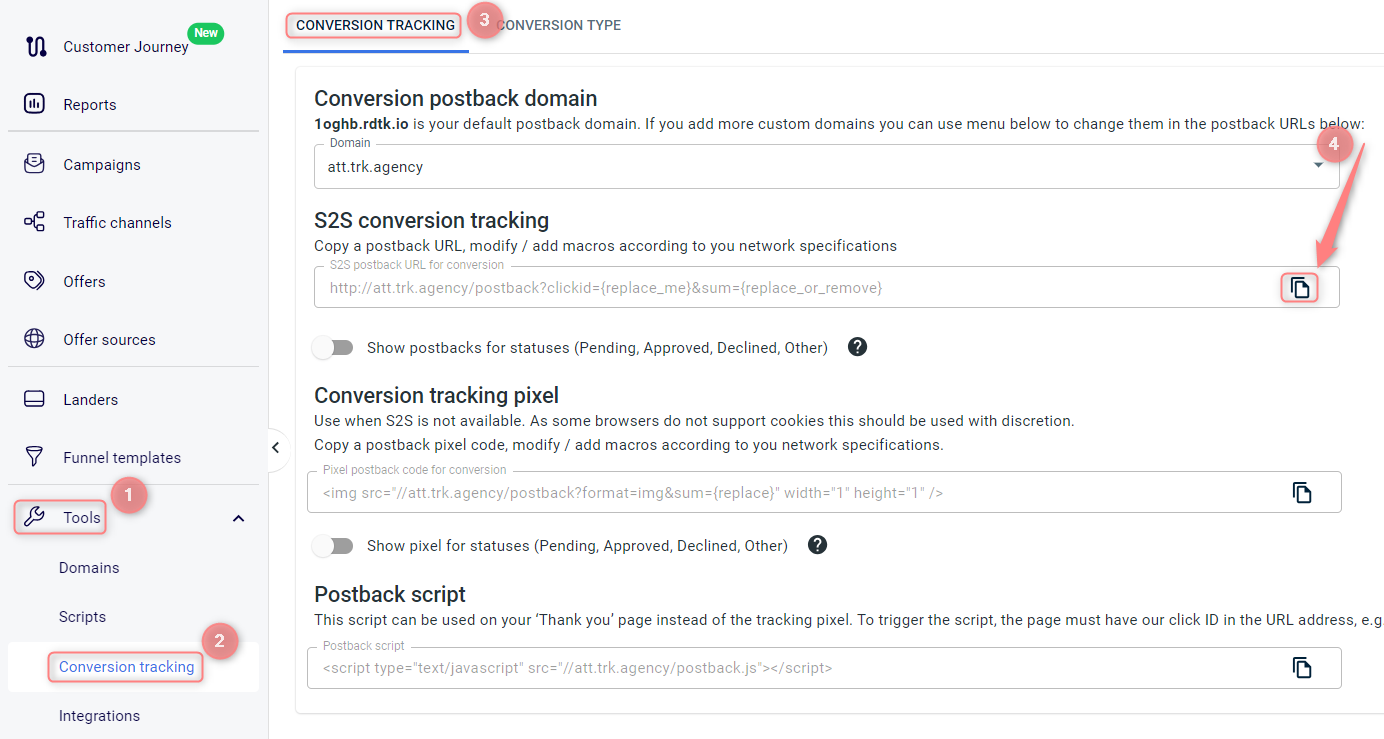
3. Put the clickid from step 1 instead of the replace_me part in the postback URL you copied within step 2.
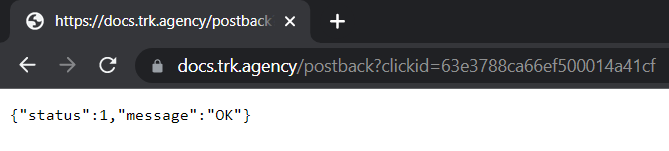
4. Paste the link to the browser and press enter. You should get this successful message:
5. The conversion will appear in your RedTrack account. Do the same with different click ids within a day. You will need approximately 20 conversions to warm up the account.
Meta needs a bit more time to attribute the conversions to your campaigns. It can take 48 to 72 hours to see the data.
10. Set up the automation
Set up the automation:
- Use this guide to help set up automated rules.
- Use this guide for setting up the auto-update cost feature.
- Here is how Ads Manager operates in redTrack.
11. Increase the event match quality
If you work with an affiliate offer, having a 10/10 match quality is impossible. There is a list of parameters Meta wants to receive, but only half of them can be covered by any third-party tool. This causes the match quality to be at a low level. And it’s not something you should struggle with.
However, RedTrack has a feature that can help you to improve the event match quality with Meta.
It does not take any additional values from Meta, but if you have them on your website/affiliate network side (for example, order ID at Shopify) or store them on your side, you can send them to RedTrack and then to Meta to increase the event match quality.
For the cases where you do not work with any offer source and promote your offers, this feature can be used only if you store the data on your side and have the technical capabilities to add this data to the conversion triggered.
1. Make RedTrack identify and accept this data with a postback first.
Offer sources / Stores → Additional parameters → add the required parameters, macro, name and assign the roles → Save changes to the template:
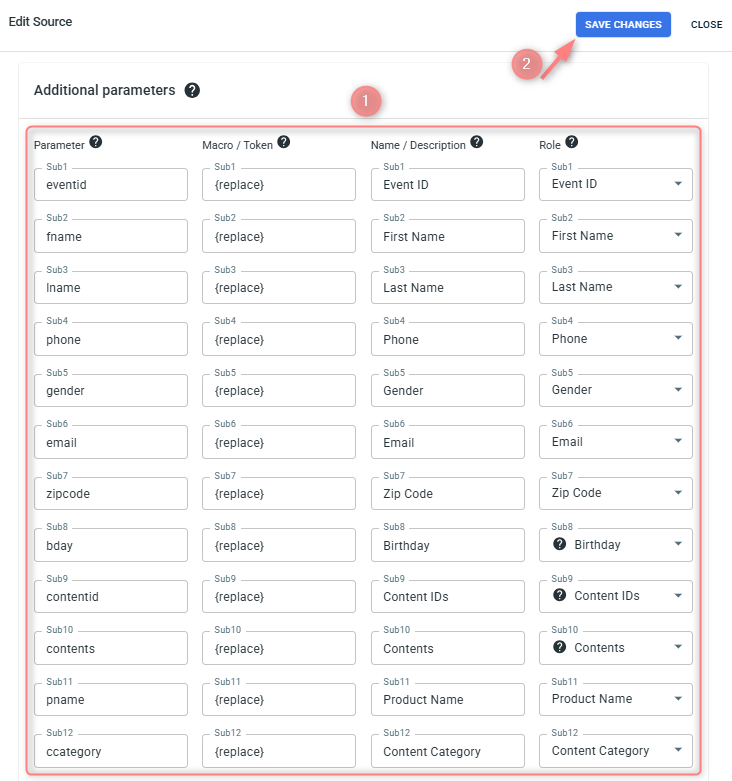
◉ Macro/Token where you have to insert {r} or {replace}.
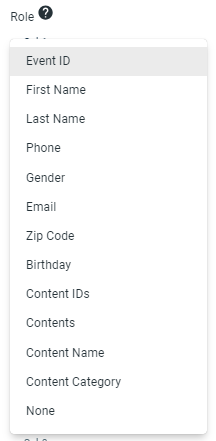
◉ Role where you assign your parameters a certain role. The list of supported roles can be viewed in the dropdown:
Data in the following columns is OPTIONAL but useful:
◉ Parameter: that’s where you give your parameter a name, but can leave it empty and in the tracking URL your parameters will be called sub1,2,3 etc.
◉ Name / Description: that’s the name you’ll see in the reports instead of sub1,2,3. For your convenience you can customize these names as you wish.
2. The added parameters will be appended to the Postback URL which you should copy:

3. Paste it to your offer source S2S postback settings as usual (or in any other postback option you use on your side).
Once the conversion postback containing those values is sent to RedTrack, we will grab it → attribute it to the appropriate campaign → send it to Meta with the specified role.
Troubleshooting
Possible errors
Sometimes, Facebook can disconnect your account randomly for security reasons (you will notice that almost immediately since the cost data stops coming at that point). All you need to do in that case is to reconnect.
“One or more of your Purchase events is missing a value and currency parameter. This may affect your return on ad spend calculation.”
If you have the value optimization on, some conversions still do not get the value. We always send the currency and value by default. This issue can be observed with test conversions. So it’s essential to send all values during the test.
Most probably, you are using Conversion API and pixel at the same time (for example, send the same data from RedTrack and your website or use RedTrack CAPI and some other system CAPI). In this case, you might see both server and pixel type under the event in your Facebook account.
Use only the RedTrack Conversion API to solve the issue.
Another reason can be a duplicate from a pixel or Conversion API without any unique event value, Facebook can recognize. What can be done? Check out this guide.
Conversion attribution may differ due to the FB algorithms (for example, they can be sent to different adsets if Facebook considers attributing some particular conversion to another adset)
Facebook has a 7-day attribution window. If there are less than 7 days between click and conversion, Facebook will attribute it. If the conversion is older than seven days, FB can exclude it from your statistics.
You cannot do anything with the conversion attribution.
Make sure you have followed the Facebook integration guide, verified your domain, and added it to your RedTrack offer settings.
This may happen when the postback mode is set to Keep original data, increment payout.
In this mode, RedTrack does not create a separate conversion record for each repeated conversion with the same click ID. Instead, it keeps one conversion record and increases its payout value. As a result, Logs → Conversions shows one conversion with an accumulated payout.
Meta may count each payout update as a separate conversion event because existing conversion events cannot be updated on Meta’s side. As a result, Meta may show more conversions than RedTrack, while RedTrack shows one conversion with an accumulated payout.
To check this, go to Logs → Conversions and review the conversion payout. If the payout is accumulated and the Keep original data, increment payout postback mode is enabled, this behavior is expected.
To record repeated conversions as separate conversion records in RedTrack, use a different postback mode.
Cost-related issues
No costs
Here is what you need to check on your side:
1. The traffic channel should be connected from the Facebook template. No error is shown.
If it is not connected or you are not sure, re-connect it.
2. The correct account is connected.
3. The dynamic parameters such as campaign id, adset id and ad id are received by RedTrack (Logs → Clicks → check sub values).
If there are no parameters in click logs, that means we are not receiving them from Facebook. Either these are your test clicks, or you need to check the Facebook campaign settings to have the parameters string in place.
4. The correct roles are assigned to the dynamic parameters.
For the cost update to work properly, the following roles should be mandatorily assigned to the Facebook IDs in your traffic channel settings:
5. Check the cost model you use in the campaign settings. It should be CPC.
Incorrect costs
What you can check to understand why the cost data is incomplete (higher or lower than the one you have on Facebook):
The first thing you need to compare is the IDs. RedTrack takes the cost data per ID (campaign, adset or ad, depending on your subscription level), so if some of the ID is missing, its cost data will not be taken to your RedTrack report.
Check if all IDs are received in RedTrack (campaign report → group by (target ID used for the cost update) → check the list). If not, check this campaign, adset or ad in Facebook and ensure the dynamic parameters are added to pass the ID.
Check if the correct roles are assigned to the Facebook IDs in RedTrack. This can be checked in your traffic channel settings:
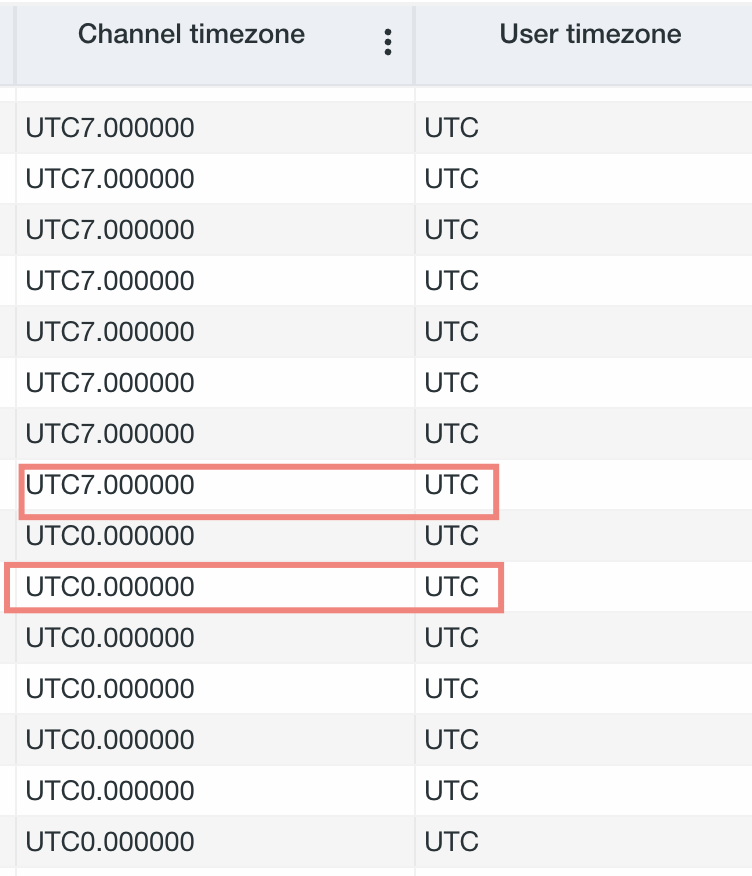
Check if the time zones match in your RedTrack account setting and in Facebook.
If the timezones of your traffic channel and RedTrack don’t match or the timezone within your ad accounts in the traffic channel do not match (for the cases when you run traffic from different ad accounts to one RedTrack campaign), the cost data matching is impossible.
Check the cost logs in RedTrack: if costs stopped coming for some time and caused this discrepancy, you might need to reconnect Facebook.
Make sure the currency matches in both systems.
Issue:
RedTrack click costs are 2–3x higher than expected.
Cause:
Meta recently introduced a “Site Links” feature that is enabled by default on new campaigns. When active, this feature:
- Automatically adds multiple landing page links to your ad.
- Redirects traffic to multiple URLs, each potentially associated with different campaign or ad IDs.
As a result, the same click can be logged multiple times across different RedTrack campaigns, inflating reported cost and traffic metrics.
How to Identify It:
→ In RedTrack, look for duplicate Adset IDs across active and paused campaigns.
→ Check your UTM parameters. If you see something like sub9=facebook-SiteLink, this feature is likely enabled.
Solution:
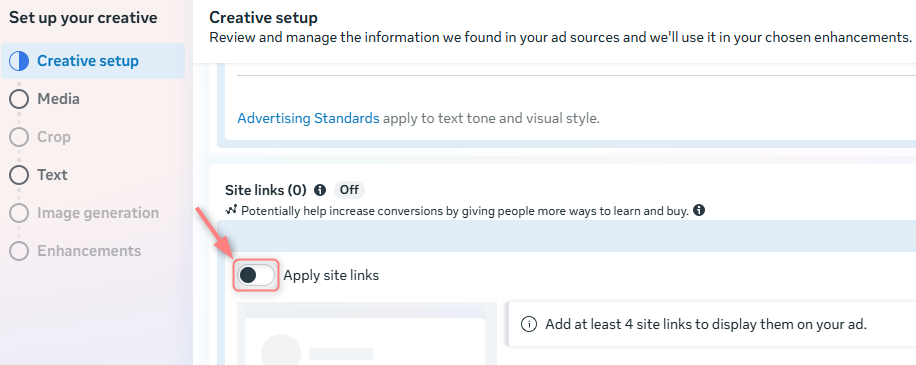
Go to your Meta ad settings → navigate to the Ad Creative section → under Creative Setup disable the Apply site links toggle → Save your changes and monitor if the duplicate tracking stops:
Lost events
Sometimes, you might need to check if there are events coming to Meta and how they come to understand if anything goes wrong.
Business Manager → Data Sources → Datasets → choose the pixel → Open in Event Manager:
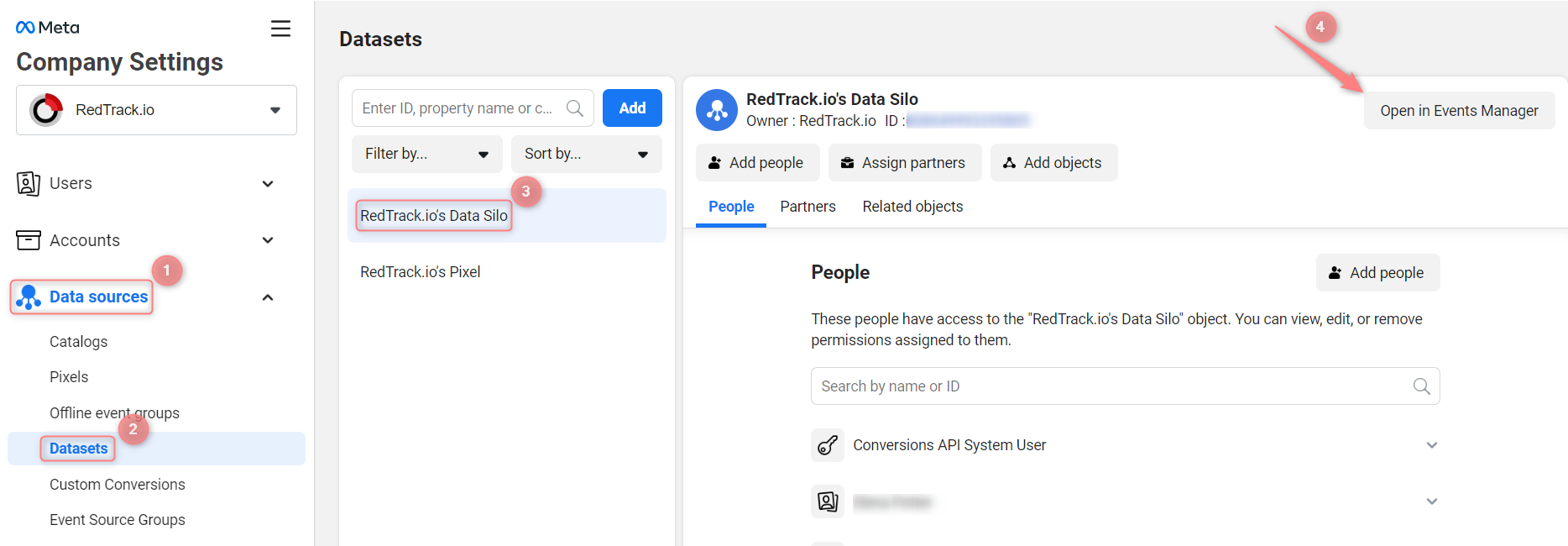
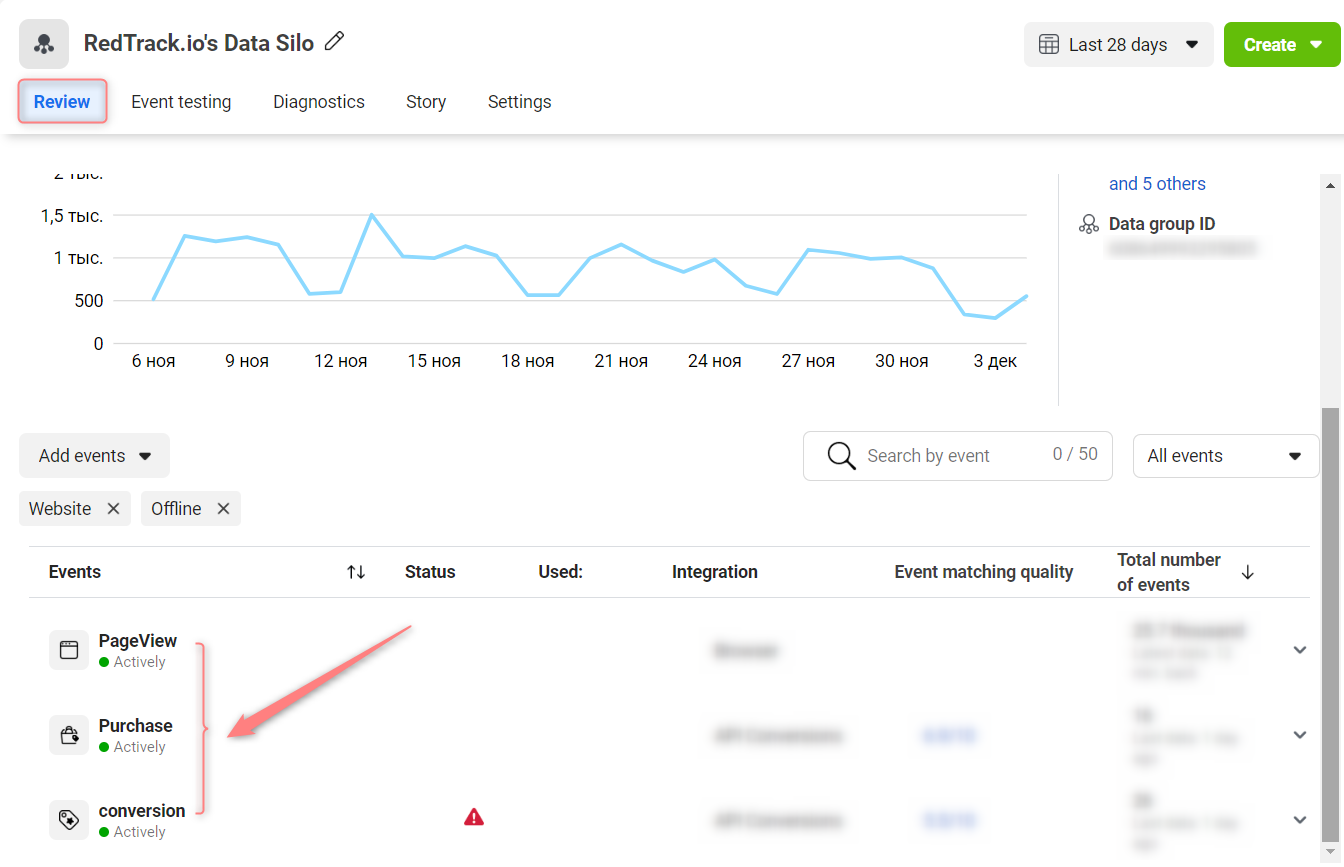
Your events are displayed under the Review: