


Opportunity Score in RedTrack Ads Manager
In collaboration with Meta.
What is opportunity score?
Opportunity score is a 0–100 metric that reflects how closely your campaigns, ad sets, and ads follow best practices from Meta. It’s calculated from the recommendations that surface in Meta Ads Manager, weighted by the estimated performance impact of each one. The score shifts when you apply or dismiss recommendations, update your campaigns, or when new issues surface in your account.
Your ad accounts connect to RedTrack through the integration with Meta, so opportunity score data flows directly into RedTrack’s Ads Manager — every connected account is included automatically. You see all accounts, all scores, and all open recommendations in one place. No tab-switching, no second login.
– A high opportunity score doesn’t mean strong ROAS.
– A low score doesn’t mean a campaign is underperforming.
The score measures optimization level: how well your account follows guidance from Meta. Don’t pause campaigns based on it.
How to view and apply recommendations
1. Before you start
Your ad accounts must be connected to RedTrack through the integration with Meta. All connected accounts are included automatically — no extra setup needed for opportunity score.
2. Open your opportunity score
In the RedTrack left sidebar, click Ads Manager → Your Opportunity Score:

The opportunity score overview opens. It shows every connected ad account, each account’s current score, how many recommendations are open, and the total score lift available if you apply them:
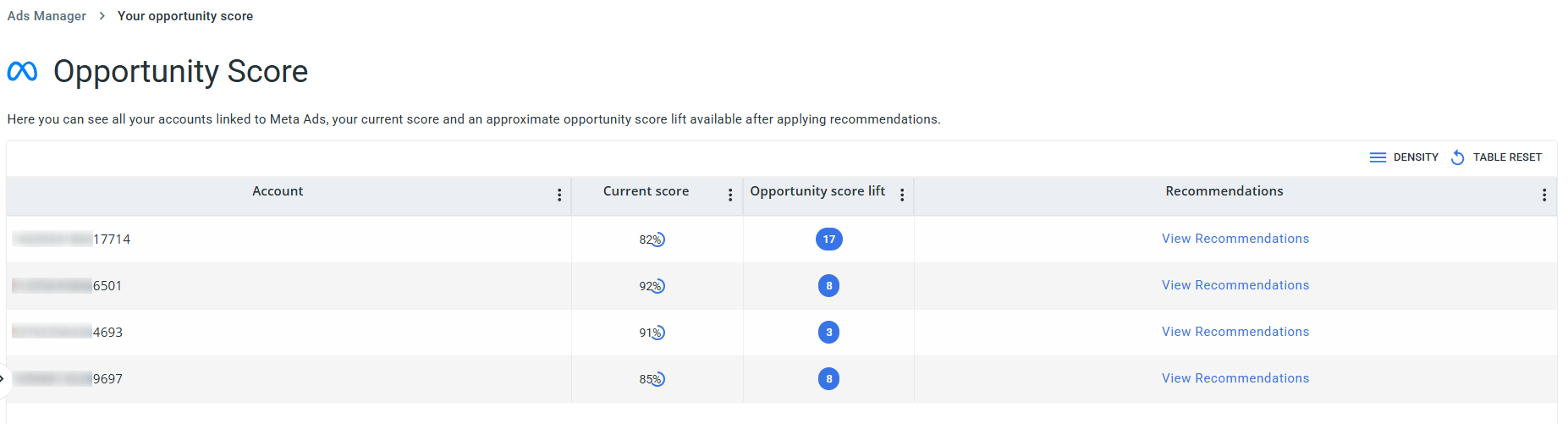
3. Review & apply the recommendations
1. Click View Recommendations next to any account. The recommendations panel lists each suggestion with a description of the change, the ad set IDs affected, and the potential score lift (shown as a point value: +1, +5, +35, etc.).
2. Select the recommendations you want to act on. The Opportunity Score Lift counter at the bottom of the panel updates as you check items. When you’re ready, click Apply Recommendations. RedTrack applies the changes through the API, so you don’t need to open Meta Ads Manager.

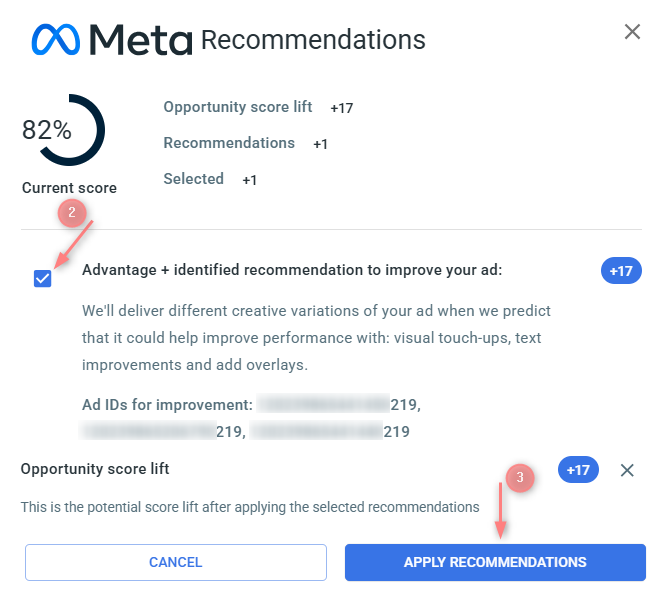
If a campaign has multiple errors, the score only increases after all errors are resolved. Recommendations tied to creating a new campaign add points only after that campaign goes live. If your ad account has an active error, opportunity score won’t display for that account.
How recommendations are weighted
Point values aren’t equal across recommendations. Each one is weighted by your business type, campaign objective, budget allocation, and performance improvements measured in experiments. That weighting shows up as the point value next to each suggestion in the panel.
A fragmented audience fix might be worth +35 points on your account. Switching to Advantage+ placements might be +5. Apply both, and the score hits 100. Skip the high-point item, and you stay well below, even if you’ve actioned everything else. Use point values to decide what to fix first.
| Detail | Value |
|---|---|
| Score range | 0–100 |
| Based on | Recommendations applied in Meta Ads Manager, weighted by estimated impact |
| Where in RedTrack | Ads Manager → Your Opportunity Score |
| Accounts covered | All ad accounts connected via the integration with Meta |
| Score won’t display when | Your ad account has an active account-level error |
| Score ≠ performance | Optimization level only, not a ROAS or CPA indicator |

